
Trust needs context.
And evidence.
Understand what the software controls, what the deployment must protect, and what your quality system must approve. Transparent boundaries make assurance discussions more useful.
Protect the boundary.
Retain the decision.
Relevant technical controls support an assurance assessment. They do not replace validation, approved procedures, supplier oversight or qualified infrastructure.
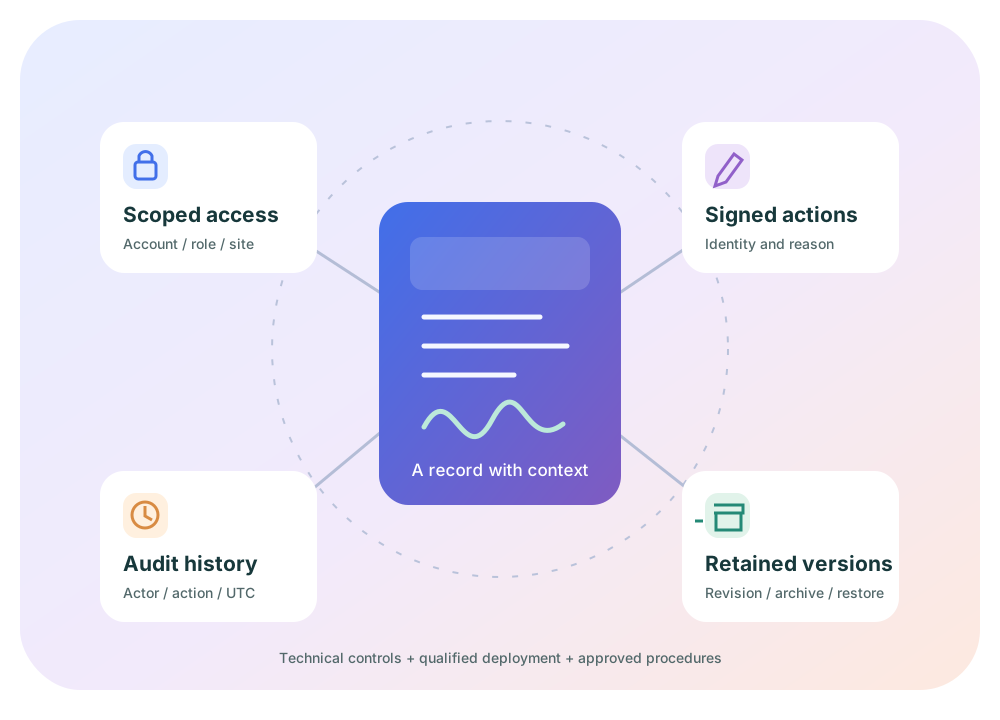
Account-scoped authority
Server-side Account, study and site checks constrain record access. Configurable Account roles operate alongside protected administrator/template roles. Access to a screen is not authorization for every action on it.
Blinding-aware visibility
Treatment and kit-type visibility depend on permissions and context across UI and API. Sensitive document categories have additional service rules. Approve role design and review provisioning against the study's blinding plan.
Signature-linked actions
Supported signed workflows request authentication and a reason, retaining their linkage to the affected event. Account document upload, revision, metadata, archival and restoration actions retain signature context.
Reviewable audit history
Audit review exposes recorded actor, action and UTC time. SHA-256 hash-chain verification supports investigation of recorded-chain integrity; completeness and privileged-storage protections require broader assessment.
Versions, not silent replacement
Account documents keep revision history and retained bytes. Archival makes a record inactive rather than hard-deleting it. Define approved retention periods, accessible archives and complete-copy expectations.
Bounded, single-holder sessions
Idle sessions end automatically after a configurable period, with an advance warning. A new sign-in ends the earlier session, and role permission changes revoke affected sessions. Each sign-out reason is shown to the user.
Two-step sign-in
A password is followed by a short-lived, single-use verification code sent to the registered email. Codes are resend-throttled and replaced on reissue. Repeated failures lock the user, and expired passwords force a change before access.
Disable, explain, record
Users and whole Accounts can be disabled automatically by security rules or manually with a reason. The reason is shown at sign-in and in administration. A disabled Account blocks all of its users. Every enable, disable, lock and unlock is kept in a history that cannot be edited.
Executed before use
An Account's MSA, GxP Quality Agreement, SLA and DPA are reviewed and executed with a Part 11 electronic signature. Each executed agreement is archived as a PDF with a SHA-256 fingerprint. Operational access stays suspended until all are executed.
A read-only Quality Assurance role
Every Account includes a blinded, read-only QA role. It can review studies, the audit trail and permitted exports without being able to randomize, dispense or change configuration.
Detect early.
Contain automatically.
Layered protections watch for hostile traffic and unusual behavior. When a threshold is crossed they respond automatically, and each response is recorded in the audit trail with its trigger.
Request inspection
A built-in request filter rejects common attack patterns and oversized requests. It also enforces trusted and blocked IP ranges, temporary blocks, anonymizing-network (TOR) blocking and optional country allow or deny lists.
Throttle before harm
Separate limits apply to sign-in attempts, overall per-client request volume and short request bursts. A distributed brute-force detector watches failures across many users. Clients that exceed a limit are temporarily blocked.
Anomaly responses
Sign-ins from locations too far apart in too short a time force a password change. Export volumes far above a user's own baseline suspend that user's exports. Bursts of privileged administrative actions raise an alert.
Graded security alerts
Security events become Low, Medium, High or Critical alerts. Alerts are written to the audit trail, emitted to operational logs and sent to configured recipients for triage.
Tamper response
Audit records are append-only and hash-chained. If a database session tries to modify or delete them, the system raises a Critical alert and can terminate that database connection.
The real client address
The web tier passes the user's actual browser address to the API. Forwarded headers are trusted only from configured proxies. Address and approximate location are recorded in the audit trail, access history and executed agreements.
Nothing goes live
without a signed decision.
Each gate below is enforced by the software, not merely recommended. Each one records who decided, when and why, under 21 CFR 11.10(a), 11.10(e), 11.10(f) and 11.50/11.70.
- 01Design verification
Two people approve every design revision.
Changes to a study's arms, products, allocation or dosing create a new design revision. A second authorized person must verify it with an electronic signature. Until then, activation, randomization and dispensation are blocked.
- 02User acceptance testing
An audited UAT package per revision.
The study's UAT package is approved before execution, then executed and signed off, and finally released by QA. A design change supersedes any open package, so testing always matches the configuration being activated.
- 03Activation gate
No QA-released UAT, no activation.
A study cannot be activated until a QA-released UAT package exists for its current design revision. The block is enforced on the server and explained to the user.
- 04Submission evidence
Masked, fingerprinted exports.
The Lifecycle & Exports tab produces submission datasets with blinded content masked and SHA-256 fingerprints, so a delivered file can be checked against its source.
- 05Platform release
Versioned, reviewed and signed.
Each platform version has a semantic version number, release notes and a manifest of controlled documents with SHA-256 fingerprints. Each document is reviewed and approved, and its integrity is re-checked before release. Promotion stays blocked until every gate is clear, and the release itself is electronically signed. Users then see the notes in What's New.
Three responsibilities.
One reviewable baseline.
Implement and test the control.
Requirements, design, code inspections, structural tests and traceability establish the technical basis. Review the exact release and configuration under change control.
Qualify the environment.
HTTPS, network boundaries, database/volume encryption, key management, backups, restoration, monitoring and recovery objectives belong to the target deployment.
Approve the intended use.
Identity verification, role approval, training, operating procedures, retention and acceptance evidence belong within the sponsor's applicable quality system.
An assurance discussion
that stays specific.
Which regulatory references inform the assessment?
Evaluate 21 CFR Part 11 alongside applicable predicate rules and FDA guidance on electronic systems, records and signatures in clinical investigations. The Quality page links the primary regulatory sources and describes control boundaries.
Read regulatory context →Is Agilix SOC 2 certified or independently audited?
No SOC 2 report, ISO certification or independent assurance opinion is represented on this website. A competitor's assurance report does not apply to Agilix. Verify any future report's issuer, scope, period, exceptions and applicable deployment before relying on it.
Are encryption, availability and disaster recovery guaranteed?
Not by this local demonstration. The current local HTTP setup is not evidence of encrypted transport. Approve target-environment encryption, backup/restore testing, recovery objectives, residency and any contracted availability commitments before production use.
How should controlled evidence be reviewed?
Review requirements, architecture/design specifications, the Part 11 assessment, risk analysis, test records and traceability for the applicable release. Each released version's document manifest lists SHA-256 fingerprints, so you can confirm a copy matches what was approved. Controlled evidence should be shared through authorized channels; this public site does not publish private validation records.
How are security events detected and handled?
Rate limits, request inspection and behavioral rules raise graded alerts and can lock users, block clients, suspend exports or disable Accounts automatically. Every automated action records its rule and reason. An automatically disabled user can be re-enabled only by a System Administrator after review. Connect alert recipients to your organization's incident process.
How is each action attributed to a person and place?
Every user has an individual account with a two-step sign-in and a single active session. The browser's real network address is passed to the API and recorded with the action. Forwarded addresses are trusted only from configured proxies, which prevents a client from spoofing its address. Shared credentials break this attribution and are prohibited.
How should incidents and security concerns be escalated?
Use the organization-approved support or security contact established for your deployment. Preserve relevant identifiers and timestamps without disclosing participant data, passwords or unblinded records publicly. The website brief is not an incident-reporting channel or monitored support queue.