
Purpose
Learn the two-step issuance and physical-check workflow. A dispensing transaction does not itself prove that the physical supply was checked.
Expected outcome
You can locate the verification control, choose the correct physical identifier and recognize a failed verification without treating it as success.
Prerequisites
A randomized subject, a pending dispensing visit, eligible site stock and Dispense.Execute. Follow the approved protocol and pharmacy/accountability procedures.
Section 1: Dispense the visit
- Open the subject and locate Dispense.
- Select the pending visit. Provide current weight or laboratory/assessment inputs in the exact units required by the saved dosing configuration. For Bracketed, Titration & Step-Up or Biomarker Adaptive modes, preview the calculated dose, level and kit quantity. A hold or unmatched values prohibit dispensing; titration follows scheduled visit order.
- Submit Dispense and read the outcome. The server recalculates and all required products must have eligible stock. Rule-based quantities replace only treatment kits, not ancillary quantities.
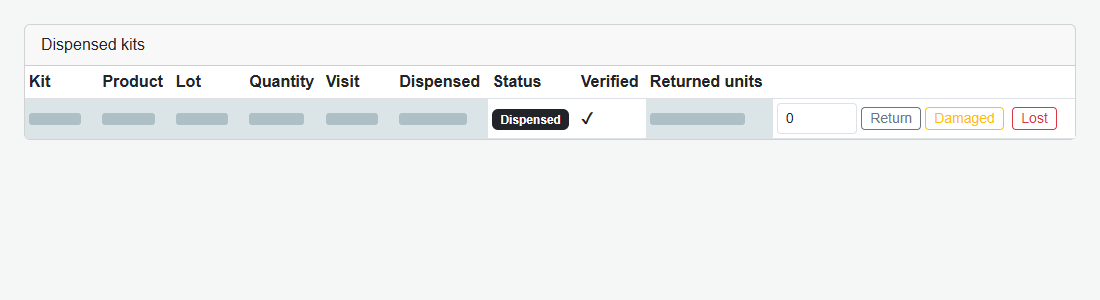
- Review the full-width Dispensed Kits section. The visit schedule appears below Dispense and Subject actions below the kit grid.
Issued, unverified supply displays Pending Verification. It has already been issued and cannot be allocated again.
Section 2: Verify the physical identifier
| Supply model | What to read and enter |
|---|---|
| Individually tracked multi-arm IP | The physical Kit ID on the package. |
| Single-arm quantity-tracked supply | The physical lot number required by the verification prompt. |
- Click Verify in the Verified column for the unverified issued row.
- Read the required identifier from the physical supply. The field is deliberately not prefilled.
- Enter it and confirm. Matching is exact and case-sensitive; surrounding whitespace is ignored.
- After success, confirm the row displays Dispensed and the verification mark.
Section 3: Status and accountability checks
Shared Kit Numbers do not combine verification: separate quantity issuance rows are checked independently. Returned, Damaged, Lost and other disposition records are not active issuance to verify. Cancel makes no change.
Troubleshooting and checks
A blank/wrong identifier leaves issuance pending and reports an error. Do not copy an identifier from a screenshot or screen just to pass the physical check. Verify the actual package and investigate discrepancies under the approved procedure.
This guide supports training and does not authorize clinical decisions, override access controls or establish regulatory compliance. The approved protocol and organizational procedures remain authoritative.