
Purpose
Execute the customer agreements that govern your organization's use of Agilix RTSM, using a 21 CFR Part 11 electronic signature.
Expected outcome
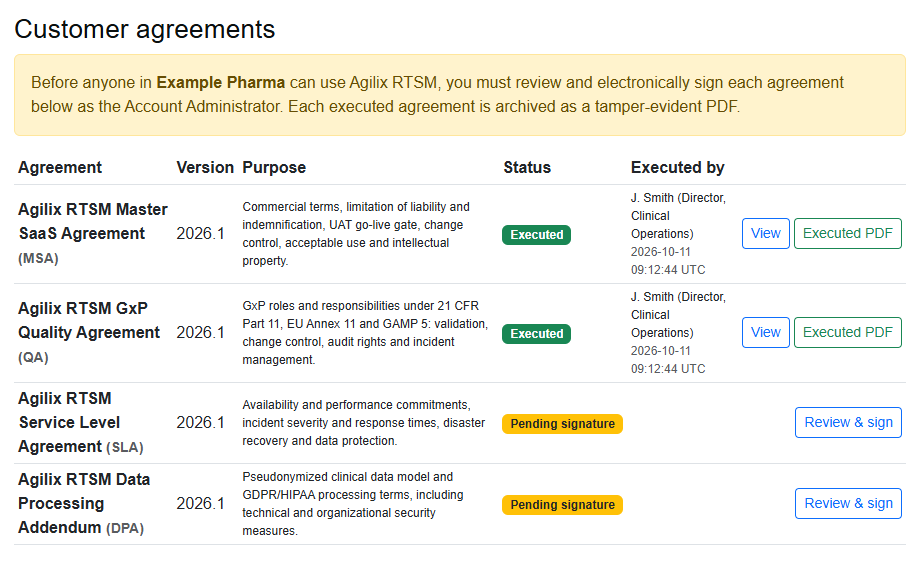
All four agreements show Executed, each with a retained PDF and SHA-256 fingerprint, and users of your Account can work in the application.
Prerequisites
- You are the Account Administrator and are authorized to bind your organization.
- Your password, for the electronic signature.
Section 1: The agreements
| Agreement | Covers |
|---|---|
| Master SaaS Agreement (MSA) | Commercial terms, liability, UAT go-live gate, change control, acceptable use and intellectual property. |
| GxP Quality Agreement (QA) | GxP roles under 21 CFR Part 11, EU Annex 11 and GAMP 5: validation, change control, audit rights and incidents. |
| Service Level Agreement (SLA) | Availability, incident response times, disaster recovery and data protection. |
| Data Processing Addendum (DPA) | Pseudonymized clinical data model and GDPR/HIPAA processing terms. |
Section 2: Review and sign
- Open your Account menu and select Customer Agreements.
- Select Review & sign for a pending agreement and read the full text, version, effective date and SHA-256 fingerprint.
- Enter your title or position, tick the confirmation that you are authorized to bind the organization, and select Sign agreement.
- Complete the electronic signature dialog with your password.
- Use Executed PDF to download the archived, tamper-evident copy.
Example: J. Smith, Director of Clinical Operations, signs the MSA and QA on Monday; the SLA and DPA remain pending, so Account users still cannot work until those are signed.
Section 3: Access until agreements are executed
Until every agreement is executed, the Account's users cannot use operational functions and see: "Access is suspended until your Account Administrator executes the customer agreements." Users who are not the Account Administrator can view agreement status but are asked to contact their Account Administrator.
Troubleshooting and checks
The signature records your name, title, time and network address in the audit trail. Do not ask a colleague to sign on your behalf. If an agreement must change, a new version is issued for signature; executed copies are never edited.
This guide supports training and does not authorize clinical decisions, override access controls or establish regulatory compliance. The approved protocol and organizational procedures remain authoritative.