
Operational detail.
Connected by design.
Agilix RTSM is randomization and trial supply management (also called IRT) for sponsors, CROs and sites. Explore what it does and how it works: configurable study workflows, connected clinical supply and a server-controlled operational foundation.
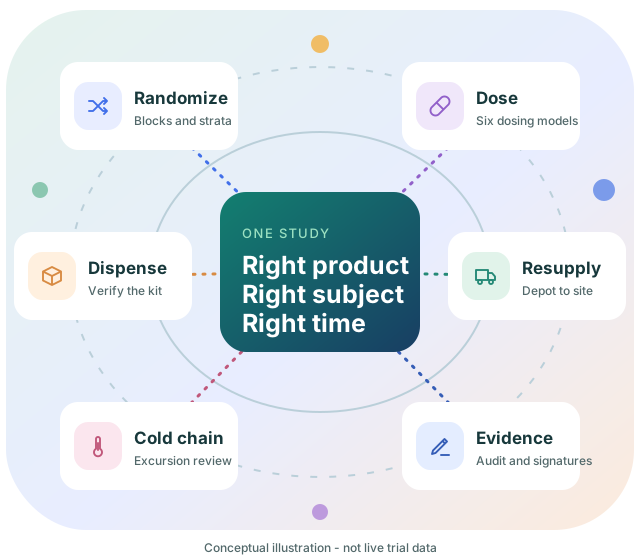
The right product, to the right subject,
at the right time.
Randomization and trial supply management (RTSM), also called interactive response technology (IRT), randomizes subjects, assigns and dispenses investigational product and keeps clinical supply in step with enrollment across sites and depots. In Agilix RTSM each study is built by configuration on one shared platform, not by per-study custom code, and each decision is recorded.
Agilix RTSM gives sponsors and study teams:
Controlled study startup
A guided ten-step design, second-person approval and a QA-released UAT package come before activation, so the first subject is randomized against a design that has been reviewed and tested.
A clearer experience for sites
Site staff see the next action in context: screening, randomization, dispensing and verification, with page-specific help and outcomes that stay visible.
Visibility you can act on
Scoped reports, location balances, shipment status, cold-chain review and a searchable audit trail give study teams a current picture of the trial.
Complete RTSM functionality
Randomization, dosing, dispensing, resupply, accountability, emergency code break and retained evidence in one system rather than a set of disconnected tools.
Randomization
Permuted blocks, minimization, stratification, cohorts and crossover.
Dosing
Fixed, weight, BSA, bracketed, titration and biomarker-adaptive models.
Sites & subjects
Site scope, screening, visits, transfers and code break.
Trial supply
Lots, packaging, depots, shipments and block-aware resupply.
Cold chain
Temperature readings, excursions, stability and signed disposition.
Reports & exports
Five report domains plus masked submission exports.
Audit & e-signatures
Hash-chained audit trail and signatures with meaning.
Security & access
Two-step sign-in, bounded sessions and access history.
Turn the protocol into
a connected specification.
Saved design settings define the behavior of allocation and visits. Operational controls make clear when a design can change and when it is locked.
Randomization design
Permuted blocks and Pocock-Simon minimization, treatment ratios, stratification factors, cohort caps and imbalance thresholds support protocol-defined allocation. Block sizes must match the arm-ratio total.
Preview, then master
A separate saved DUMMY schedule supports review without assigning subjects. A new operational master can use the reviewed dummy settings when the saved design is unchanged and assignment has not started.
Product-specific visits
Define day offsets, visit windows, optional country applicability, treatment-product slots and additional non-treatment products. Explicit product quantities override legacy dosing-derived kit counts.
Persistent two-arm crossover
A configured Cross Over visit switches treatment for that visit and later visits until another crossover switches it back. Original randomization and master identifiers remain unchanged.
Investigational products
Configure units per kit, storage limits and stability budgets. Products not linked to any treatment arm are classified as non-randomized at lot creation and do not require a randomization schedule.
Provenance-aware exports
Export master or DUMMY schedules in PDF or selected-column CSV. Generated schedules carry captured settings; imported lists explicitly identify limits on external generation provenance.
Dosing models
Choose fixed, weight-based, BSA-based, bracketed, titration or biomarker-adaptive dosing. Only an unblinded user authorized to manage randomization can change randomization, stratification or dosing settings.
Revisioned design, second-person approval
Every saved change to the design opens a new revision. A second unblinded user reviews and electronically signs it. A live study's design changes only with a recorded amendment reason.
Activation gated by UAT
A study cannot be activated until its current design revision is approved and has a user acceptance testing (UAT) package released by QA. A later design change supersedes the package.
- ConfigureProducts, arms, visits, randomization and dosing
- PreviewReview a DUMMY schedule without assigning subjects
- ApproveA second unblinded user e-signs the revision
- Test & releaseSigned UAT package, released by QA
- ActivateOnly an approved, released design goes live
The next action,
in the right context.
Account-first navigation, study selection and site scope connect the user's responsibility to the records they may access.
Screen and randomize
Record a subject within an active site, supply the configured strata, select an open cohort where applicable and confirm eligibility before randomization.
Site-stocked block allocation
New subjects can be allocated using eligible kits within an available site block. Revisits prefer a different compatible block; when none exists, eligible treatment-matched stock provides the supported fallback.
Dispense, then verify
Issuance and physical verification are separate. Unverified issuance displays Pending Verification. Enter the physical kit ID for individually tracked multi-arm supply or lot number for single-arm quantity-tracked supply.
Accountability and subject actions
Review full-width dispensed-kit history, product/lot context, visit completion and return records. Transfer, discontinuation, replacement and emergency code break remain separately controlled.
Blinding-aware presentation
Role permissions govern treatment and product visibility across UI and API. A screenshot captured as an unblinded administrator does not represent a blinded site's view.
Feedback that stays visible
Floating success/error messages remain near the top of the workflow while scrolling. Users can read and dismiss the outcome rather than treating a button click as proof of completion.
- ScreenRecord the subject at an active site
- RandomizeStrata, cohort and eligibility confirmed
- DispenseEligible kits assigned for the visit
- VerifyPhysical kit or lot confirmed separately
- AccountReturns, replacements and history retained
From the depot
to the dispensing visit.
Packaging and signed release
New lots remain in Packaging until authorized staff complete the workflow with an electronic signature and reason. Released status does not override expiry, quarantine or other eligibility checks.
External label mapping
Map the generated identifiers or import arm-matched CSV/XLSX labels as permitted by the packaging workflow. Protect master-ID matching and retain an immutable mapping PDF when generated by that workflow.
Quantity-based stock
Single-arm and non-randomized supply can retain a shared Kit Number with separate location/status balances. Package quantity and units per kit remain distinct.
Shipments and receipt
Move eligible depot stock to active sites, track dispatch and receipt, and preserve quantity history. Supply at a depot is not site inventory until the transfer and receipt are completed.
Block-aware resupply
Site thresholds are aligned to study blocks by default. Documented overrides support exceptions. Replenishment works with configured stock and study rules rather than promising unrestricted forecasting.
Cold-chain disposition
Review temperature readings, excursions and stability impact. Authorized QA disposition is signed; calculated recommendations remain advisory until reviewed.
- PackageLots stay in Packaging until signed release
- Depot stockQuantity and status balances by location
- ShipEligible stock dispatched to active sites
- ReceiveSite inventory only after receipt
- MonitorExcursions reviewed with signed disposition
Keep the evidence.
Keep the boundaries.
Account isolation
Account profiles and allocated studies create organization boundaries. Account administrators operate within their own Account; system-level controls remain distinct.
Retained physical documents
Thirteen document types support authorized upload, revisions, metadata changes, archive and restore. Version history retains who, when and why; standard archival is not a hard delete.
Scoped reports
Reports span five domains with study/site filters and blinding restrictions. CSV, JSON and PDF exports require Data.Export in addition to report access. Ordinary exports are not signed regulatory copies.
Audit review
Search UTC audit events and verify the recorded hash chain. Verification is a technical integrity check, not proof that a privileged actor could never change storage or that every event was captured.
Controlled permissions
Configure Account-specific roles while protecting built-in administrator and global template roles. Role changes revoke affected active sessions and require a new sign-in.
Recovery and validation support
Account recovery workflows and controlled specification/test documents support operations and review. Production readiness still requires deployment qualification and intended-use validation.
Audited UAT package
Approve, execute and sign off the study UAT package, then QA releases it. Each step is signed and recorded, and the package is tied to one design revision.
Submission exports
Produce masked, hashed datasets for regulatory submission from the Lifecycle & Exports tab, with fingerprints that let a recipient confirm the files are unchanged.
Independent QA oversight
Every Account includes a blinded, read-only Quality Assurance role. It can review studies, the audit trail and permitted exports without randomizing, dispensing or changing configuration.
- RecordWho, when, what and why for each change
- ChainAudit events linked by a verifiable hash chain
- SignElectronic signatures with meaning and reason
- ReviewScoped reports and read-only QA oversight
- ExportMasked, fingerprinted submission datasets
Know who is signed in.
And what they agreed to.
Access is personal, time-limited and recorded. Each user's sign-ins, lockouts and status changes are kept with the browser's real IP address and approximate location.
Two-step sign-in
A password is followed by a short-lived, single-use code sent to the registered email. Repeated failures lock the user, and expired passwords force a change before access.
Bounded sessions
Idle sessions end automatically after a configurable period, with an advance warning. A new sign-in ends the earlier session, and the reason for every sign-out is shown to the user.
Agreements before use
The Account Administrator e-signs the Master SaaS Agreement, GxP Quality Agreement, Service Level Agreement and Data Processing Addendum. Each is archived as a PDF with a SHA-256 fingerprint; access stays suspended until all four are executed.
Access status and history
Users and Accounts can be disabled by security rules or manually with a reason, which is shown at sign-in. Every enable, disable, lock and unlock is kept in a history that cannot be edited.
What's New with each release
After a platform release, users see its version number, new features and enhancements in a What's New panel, and can reopen earlier release notes later.
Help on every page
A page-specific Help panel explains the terminology and gives worked examples, so users can check a field's meaning without leaving the workflow.
- PasswordPersonal credentials with expiry rules
- Email codeShort-lived, single-use verification
- AgreementsAll four customer agreements executed
- SessionIdle timeout with an advance warning
- Recorded exitReason, real IP and approximate location kept
One platform.
Every study configured, not rebuilt.
Flexibility belongs in the study design; authority belongs on the server. Agilix RTSM is a single .NET 10 platform with a Blazor Server web application, an ASP.NET Core API and PostgreSQL, deployed in containers. User experience, rule enforcement and retained records stay separate, so a study can change through approved configuration while the controls around it stay the same.
Configured, not custom-coded
Every study runs on the same release. Protocol differences live in saved, revisioned configuration that is approved and tested, so a new study does not need new code.
API-first authority
Every screen uses the same HTTP API, described with OpenAPI. Permissions, Account and site scope and blinding are enforced on the server, never left to the browser.
Containerized deployment
The web application, API and PostgreSQL database run as separate containers behind HTTPS, with health checks and the real client IP forwarded for audit and security.
Versioned, signed releases
Platform changes ship as numbered releases with release notes, fingerprinted controlled documents and an electronically signed promotion decision.
- BrowserBlazor Server UI over HTTPS
- Edge controlsRequest filter, rate limits, brute-force detection
- APIAuthentication, permissions, scope and blinding
- Domain rulesTreatment, stock eligibility and state changes
- RecordsPostgreSQL data, audit chain and signatures
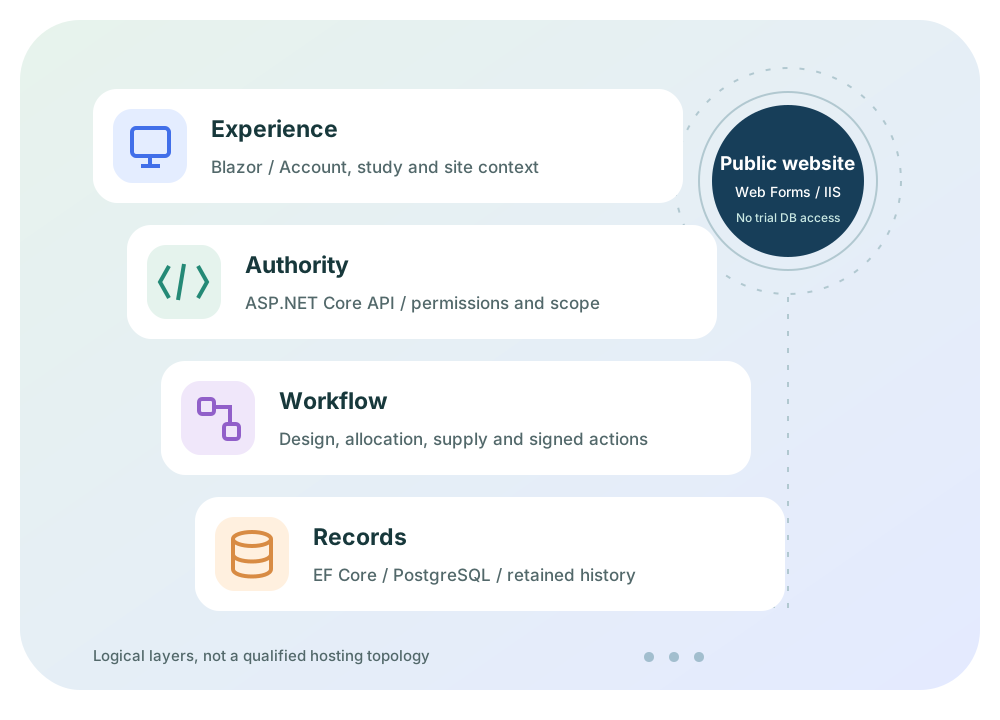
Context-aware experience
A Blazor Server web application on .NET 10 presents study, subject and supply workflows. Saved configuration defines protocol behavior; dummy previews remain separate from operational master data.
Server-side authority
The ASP.NET Core API enforces authentication, permissions, Account/study/site scope and blinding. Domain services validate treatment, stock eligibility and controlled state changes rather than trusting browser inputs.
Persistent operational records
EF Core and PostgreSQL retain study data, stock balances, audit events and signature context. Integrity checks support review; they are not encryption or proof that every required event was captured.
Security at the edge
A request filter, separate sign-in, per-client and burst rate limits, and brute-force detection run before business logic. Security events become graded alerts that are written to the audit trail.
Controlled platform releases
Each platform version has a semantic version number, release notes and a manifest of controlled documents with SHA-256 fingerprints. Promotion stays blocked until every gate is clear, and the release is electronically signed.
Integration-ready, by agreement
The documented API is the foundation for connecting EDC, supply or reporting systems. Each integration is scoped, built and qualified for the target deployment rather than assumed to exist.
Separate public website
This ASP.NET Core Razor Pages website runs independently in a Linux .NET 10 container. Product guidance and knowledge articles do not authenticate trial users or connect to the trial database.
Clear capability boundaries
Agilix does not claim competitor integrations, AI assistants, automated regulatory certification or guaranteed study-startup timelines. External integrations, high availability, SSO and production hosting controls must be designed and qualified for the target deployment where required.