
Purpose
Translate an approved randomization specification into saved study design, then distinguish review previews from the operational assignment list.
Expected outcome
You understand which settings affect allocation, why a design must be saved before list generation, and when assignment locks prevent replacement.
Prerequisites
Select the correct Account/study. Study configuration requires Studies.Manage. Master-list operations require unblinded Randomization.Manage. Product administration requires the applicable inventory permissions and unblinded visibility.
Study Settings: protocol information
- Open the study and select Settings. Organization & Administrative Identification contains the unique protocol ID, official and brief titles, version, NCT/EU CT/UTN or other registry IDs, sponsor address/contact, collaborators and responsible party.
- Trial Design & Methodology records phase, primary purpose and descriptive study design structure. Operational design remains in Design.
- Patient Eligibility & Population records condition and coding terms, age limits/units, sex eligibility, healthy volunteers and verbatim inclusion/exclusion criteria. Blank age limits mean no minimum or maximum. These fields are descriptive only; they do not automatically enforce enrollment eligibility.
- Outcome Measures & Endpoint Timelines provides primary, secondary and exploratory rows, each with a required title, description and time frame. Up to 50 rows per category may be recorded.
- Oversight & Regulatory Data records ethics status, approval version/date, board/contact, FDA IND/IDE status/numbers, EMA status, expanded access, Section 801 applicability, FDA-regulated drug/device flags and DMC/DSMB oversight. Unanswered Yes/No fields remain Not specified rather than defaulting to No.
- Click Save settings and read the result. Account-scoped before/after history is retained, and stale changes are rejected. Reload before retrying a stale save. Operational dosing and randomization are not changed by this action.
Settings does not add a separate arms/interventions matrix or site-location editor. Those operational records remain in Design and Sites. Recorded regulatory information is sponsor-provided, not automated approval verification, legal applicability determination or registry submission.
Section 1: Configure and save design
Complete Settings first. Open Studies & Design, open the protocol and select Design. Each card header is numbered in the recommended configuration sequence.
- Step 1 Investigational Products: define products and handling values from approved product documentation using their own save actions.
- Step 2 Treatment arms: define arm codes/names, allocation ratios and product links.
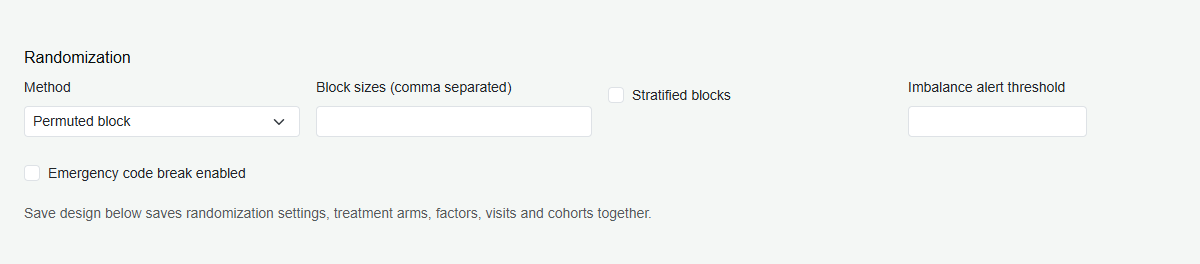
- Step 3 Randomization: set the method, block sizes or minimization probability, stratified blocks and imbalance alerts.
- Step 4 Stratification factors: add factors and levels; weights influence minimization only.
- Step 5 Cohorts: add optional cohorts and enrollment caps.
- Step 6 Visit schedule: define visits, dispensing/randomization flags, product quantities, country overrides and unscheduled dispensing.
- Step 7 Dosing & Dispensation: configure the dosing mode and any rules from the approved protocol.
- Step 8 Save design: saves steps 2–7 together in one transaction; live amendments require a reason. Read the outcome before generating any schedule.
- Step 9 Design approval: a second authorized user verifies the saved revision and approves it with an electronic signature.
- Step 10 Master randomization data and Step 11 Randomization exports: generate or import the master only after the design is saved, then review and protect exports.
Hide section notes and sample study settings
On the Design tab, two controls appear at the right of the tab bar.
- Hide section notes (advanced users): hides every explanatory note on the Design page, including the Randomization and Dosing & Dispensation purpose and selected-option notes. The preference is remembered in the current browser only and does not change the study configuration or audit trail. Turn it off to show the notes again.
- Sample study settings: opens a separate printable window with sample values for every Design parameter in Step 1?10 order, for an illustrative double-blind Remicade (infliximab) vs placebo Crohn's disease study. It includes stratification by Age and Disease Severity, and examples of Weight-based, Bracketed, Titration & Step-Up and Biomarker Adaptive dosing. The values are illustrative, not clinical guidance; always configure from the approved protocol and verify the configuration.
Blind-protected design steps
Randomization settings could let a user predict upcoming treatment assignments, so the Design tab protects them in two ways.
- Who can edit: Step 3 Randomization, Step 4 Stratification factors and Step 7 Dosing & Dispensation can be changed only by a user with Studies.Manage who is also unblinded and holds Randomization.Manage. System Admin and Account Admin meet this rule by default. Other study managers can still edit Steps 2, 5 and 6, but Steps 3, 4 and 7 are read-only for them and Save design keeps those settings unchanged.
- What blinded users see: the randomization method, block sizes, stratified-block switch and minimization assignment probability are withheld. Step 3 shows a Blinded message and the Studies list shows Blinded instead of the method.
- Server enforcement: the API applies the same rules, so a request that changes these settings without the required rights is rejected even if it does not come from the screen.
Design approval (second-person verification)
Study design is verified by a second person before it can be used, so a single user cannot both change and release allocation or dosing rules.
- Every saved change to Steps 2–7 (arms, randomization, factors, cohorts, visits, dosing) opens a new design revision. New studies start at revision 1 pending. Saving without changes does not open a revision. The study header shows Design rev N pending approval or Design rev N approved.
- A different user opens Design → Step 9 Design approval, reviews the saved design against the approved protocol and randomization specification, and selects Approve design revision.
- The approver re-enters their password and a reason. The signature meaning is Approve study design revision N.
- Who can approve: an unblinded user with
Studies.ManageandRandomization.Managewho did not make the latest design change. The last editor cannot approve their own change. - While pending: study activation, randomization and dispensation (scheduled and unscheduled) are blocked by the API. Screening and dose previews continue. Live amendments take effect when saved, so arrange approval promptly.
- Stale reviews: if the design changes after the reviewer loaded it, approval is rejected. Reload and review the new revision.
- Records: the audit trail records
DesignRevisionCreatedandDesignApproved, including revision, changer, approver, reason, signature and a design snapshot (21 CFR 11.10(e), 11.50, 11.200).
Configuration choices and consequences
Every Design section includes an inline note. Read it before saving configuration changes, alongside the approved protocol and change-control procedures.
- Randomization: block sizes and arm ratios affect allocation sequences; stratification creates separate sequences per factor-level combination. Minimization probability is not an arm ratio, and imbalance alerts do not rebalance prior subjects.
- Investigational Products: pack contents, dose strength and handling values serve different purposes. Product edits are saved separately and do not release lots or override quarantine/expiry.
- Dosing & Dispensation: review calculation mode, exact units, dose-rule holds and rounding. Higher shelf-life requirements can exclude short-dated stock. Rule modes prohibit unscheduled manual quantities.
- Treatment arms: verify product links and positive relative ratios before stocking and list generation. Randomized depot lots protect arm identities, mappings and ratios.
- Stratification factors: more levels create more block strata; weights influence minimization, not dosing. Master-linked packaging locks factor definitions.
- Visit schedule: review ordering, timing, dispensing/randomization flags, product quantities, country overrides, Cross Over and unscheduled permissions. A country-specific row overrides a global row with the same name.
- Cohorts: a positive cap closes randomized enrollment at the limit; zero means no numeric cap. Order does not automatically open cohorts sequentially.
- Master randomization data: capacity may exceed target times over-allocation to complete blocks; capacity is not enrollment authorization. Assignment or packaging locks replacement.
- Dummy preview and exports: dummy rows never assign subjects. Review acknowledgement is not an electronic signature. Protect unblinded exports and distinguish operational Master from DUMMY.
These notes do not replace approved clinical decisions or override assignment, packaging and amendment safeguards.
Dosing & Dispensation: modes and calculation
Fixed uses visit kit counts; Weight-based calculates weight times dose per kg; BSA uses the Mosteller height/weight formula. Existing explicit visit quantities retain their behavior for these modes. Unblinded users with Randomization.Manage can also configure Bracketed Dosing (Band-Based), Titration & Step-Up and Biomarker Adaptive Dosing.
- Select the mode in Design, then define dose units and the uniform dose per complete kit. Exact-dose-only is the default; choose rounding up only when explicitly permitted by the approved protocol.
- For Bracketed dosing configure weight bands in kg. For Titration or Biomarker dosing add parameter names and exact units, then lower-inclusive / upper-exclusive value bands. Blank bounds are open-ended. Multiple bands in one rule are AND conditions.
- Give each rule a unique name and resulting dose level and total target dose per visit, or select Hold. Titration also requires a previous level (START for first dose), minimum/optional maximum completed scheduled dispensing visits and any safety or efficacy bands. Define maintenance, step-up, step-down and hold transitions explicitly.
- Save design. Overlapping rules, invalid bounds and missing parameter references are rejected; unmatched values remain blocked at runtime. Changes affect future calculations, not historical doses.
- On the Subject page enter current values in the configured units and preview the dose and kit quantity. Dispense recalculates, validates the transition and allocates eligible treatment-matched stock. The calculated quantity replaces the treatment slot only; ancillary quantities remain configured in Visit Schedule.
Titration follows scheduled visit order and retains the last successful level; holds do not advance it. Existing subjects with prior completed visits but no retained titration level cannot silently use a START rule. Rule modes do not permit unscheduled manual quantities, mixed-strength optimization, partial kits, automatic unit conversion or automatic EDC/laboratory ingestion. Initial dispensing randomization visits require the same inputs.
Parameter examples from the dosing reference
- Metabolic/glycemic: fasting or capillary blood glucose, HbA1c.
- Oncology/target engagement: phosphate/phosphorus, IL-6, CRP, ferritin, ctDNA and tumor markers PSA, CA-125 or CEA.
- Hematology: INR, ANC, platelets, hemoglobin.
- Renal/liver: eGFR, creatinine, ALT, AST, total bilirubin.
- Cardiovascular/therapeutic monitoring: trough concentrations, BNP/NT-proBNP, blood pressure and heart rate.
These are parameter examples, not treatment recommendations. The application supplies no active clinical threshold or dose defaults. Authorized unblinded configuration users enter and verify approved protocol values and exact units. Successful dosing retains input values, configuration, selected rule and resulting dose level in account-scoped audit history. Follow approved validation and change-control procedures before clinical use.
Purpose and selection-specific guidance
Randomization and Dosing & Dispensation each show two notes: a purpose overview with shared safeguards, followed by Selected option guidance. Changing Method switches between Permuted block and Pocock-Simon minimization guidance. Changing Dosing mode switches between Fixed, Weight-based, BSA-based, Bracketed, Titration and Biomarker Adaptive guidance, explaining that selection's calculations, required inputs and consequences. The notes update immediately without saving; configuration takes effect only after Save design succeeds.
Section 2: Field reference
| Field | Behavior or constraint |
|---|---|
| Method | Permuted block or Pocock-Simon minimization. |
| Block sizes | Positive integers; multiples of the sum of arm ratios. |
| Minimization probability | 0.5-1.0 when used by the selected method. |
| Target sample size | 1-100,000 for supported master generation. |
| Over-allocation factor | 1.0-2.0; describes generated list capacity, not dosing. |
| Identifiers | Configured digit count, prefix/suffix and optional arm-code suffix. |
Section 3: Review dummy data and create the master
- Create DUMMY data to review the saved specification separately from live assignment.
- Export a permitted preview and verify settings with authorized stakeholders.
- Where supported, acknowledge review and create a separate master using captured dummy settings while design remains unchanged and assignment has not started.
- Alternatively, use the supported master generate/import action with the approved specification.
The acknowledgement is not a formal multi-party approval or an electronic signature. Master/dummy generation requires Permuted block; minimization configuration does not imply master-generation support.
Troubleshooting and checks
If randomization, dispensation or activation reports that a design revision is pending approval, ask a second authorized unblinded user to approve it at Design Step 9. Unsaved edits are not generation inputs. Once the first assignment occurs, configuration/master replacement is locked. CSV import requires RandId, ArmCode and StratumKey; uniqueness and saved-design matching are checked. Imported generation provenance is not independently verified.
This guide supports training and does not authorize clinical decisions, override access controls or establish regulatory compliance. The approved protocol and organizational procedures remain authoritative.