
Purpose
Learn what changed in each released version of Agilix RTSM and how to use the new functions safely.
Expected outcome
You can identify the version you are running, read unread release notes and open the related controlled documents.
Prerequisites
Any signed-in user. Release notes appear only after a version has been formally released under electronic signature; until then the panel states that no platform version has been released yet.
Section 1: Open What's New
- Select What's New in the top bar. A red count shows how many released versions you have not read.
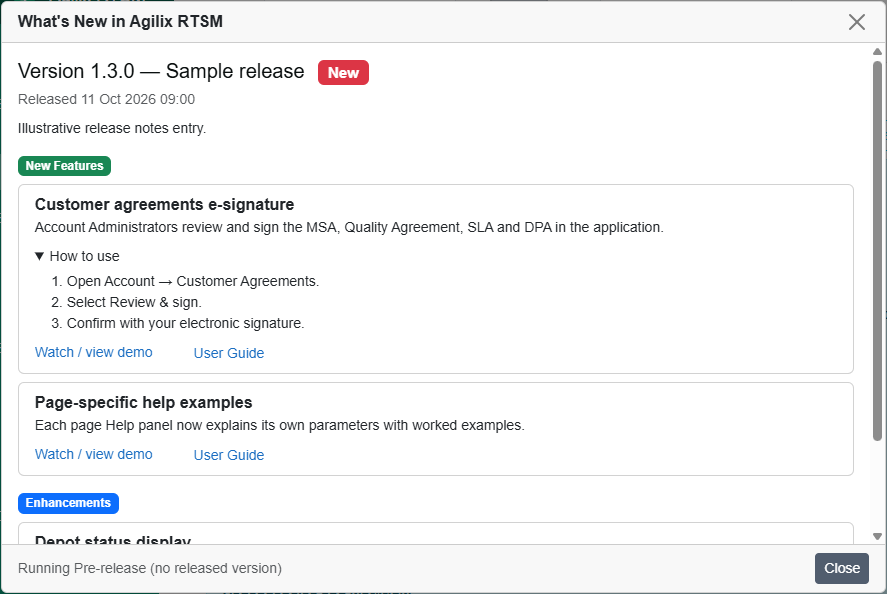
- Each version shows its number, title, release date and a New badge if unread.
- Notes are grouped as New Features (green), Enhancements (blue) and Bug Fixes (yellow).
- Close the panel; the versions are marked as read for your user.
Section 2: Use a release note
- Expand How to use for numbered steps.
- Watch / view demo opens an approved demonstration link in a new tab.
- A document link downloads the related controlled document, such as an updated user guide.
Example: version notes list "Depot status display" under Enhancements; a supply manager reads it, then checks that only Active depots are offered for new lots.
Section 3: Know your running version
The panel footer and the page footer show the running version label (for example "Running 1.3.0" or "Pre-release (no released version)"). Quote this label when reporting an issue.
Troubleshooting and checks
Release notes describe the change; they do not replace your organization's training or procedures. If a described function is not visible, check your role permissions and study context.
This guide supports training and does not authorize clinical decisions, override access controls or establish regulatory compliance. The approved protocol and organizational procedures remain authoritative.