
Purpose
Understand how visit timing, explicit product quantities and crossover control future dispensing.
Expected outcome
You can explain a treatment slot versus additional non-treatment supply and recognize the sequencing restrictions on crossover visits.
Prerequisites
Approved visit and product specification; correct Account/study; authorized study-design access. Use the live-study amendment workflow where required.
Section 1: Define the visit
- Open the study's Design tab and locate Visit schedule.
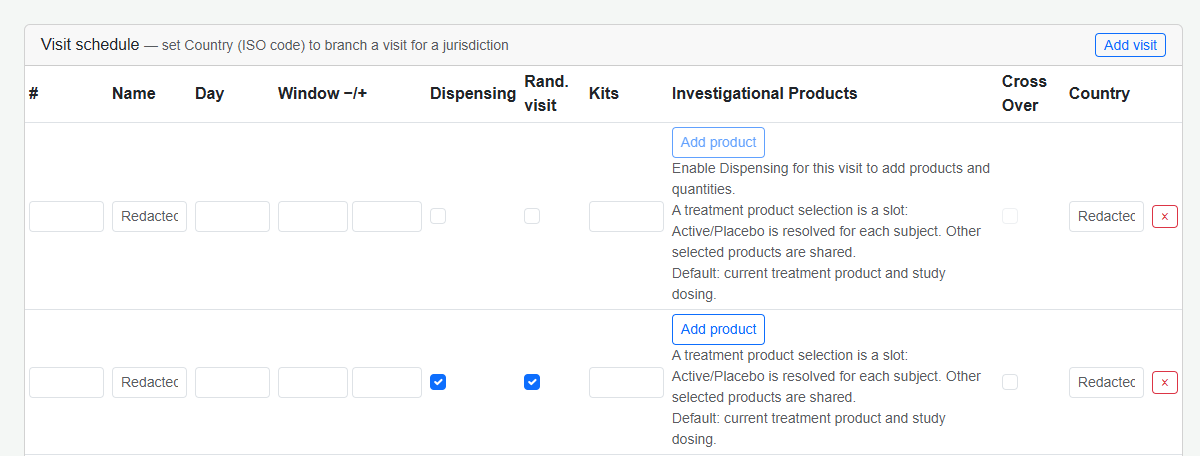
- Set the visit name, order, day offset and allowed before/after windows.
- Set dispensing/randomization flags and optional country applicability.
- For explicit supply, add a product and quantity; repeat for additional products.
- Save the design or apply the approved amendment, then check feedback.
Section 2: Product and quantity rules
At most one arm-linked treatment slot is configured for a visit; it resolves to the subject's current treatment. Additional non-treatment products are shared requirements. Explicit quantities must be 1-10,000, with a total at most 10,000 per subject. They override Fixed/Weight/BSA dosing-derived quantities; the legacy Kits column is disabled until explicit products are removed. Bracketed, Titration and Biomarker modes instead calculate the treatment-slot quantity while retaining ancillary quantities.
Legacy arm-specific visit rows are retained with a warning until deliberately replaced. Do not treat a warning as proof that migration has occurred.
Section 3: Persistent crossover
For the supported two-arm design, a checked Cross Over visit switches between the two distinct arm products for that visit and subsequent visits. Another checked visit switches back. Original assignment and master ID remain unchanged.
- Confirm the two distinct arm products and approved sequence.
- Give dispensing visits distinct order numbers.
- Complete visits in schedule order; future treatment cannot bypass earlier required dispensing.
- Confirm product visibility only with an authorized unblinded role.
Troubleshooting and checks
Historical treatment sequences cannot be rewritten. A missing product may indicate blinding, an invalid slot or incomplete design. Verify the saved specification rather than changing clinical treatment based on the UI alone.
This guide supports training and does not authorize clinical decisions, override access controls or establish regulatory compliance. The approved protocol and organizational procedures remain authoritative.