
Purpose
Get guidance on the page you are using without leaving the application.
Expected outcome
You can open the Help panel, read the page's terminology and use the worked examples to interpret each parameter.
Prerequisites
Any signed-in user. Help content is informational; the approved protocol, pharmacy manual and local procedures always take precedence.
Section 1: Open the Help panel
- Select Help near the page title.
- Read the page purpose and step-by-step guidance.
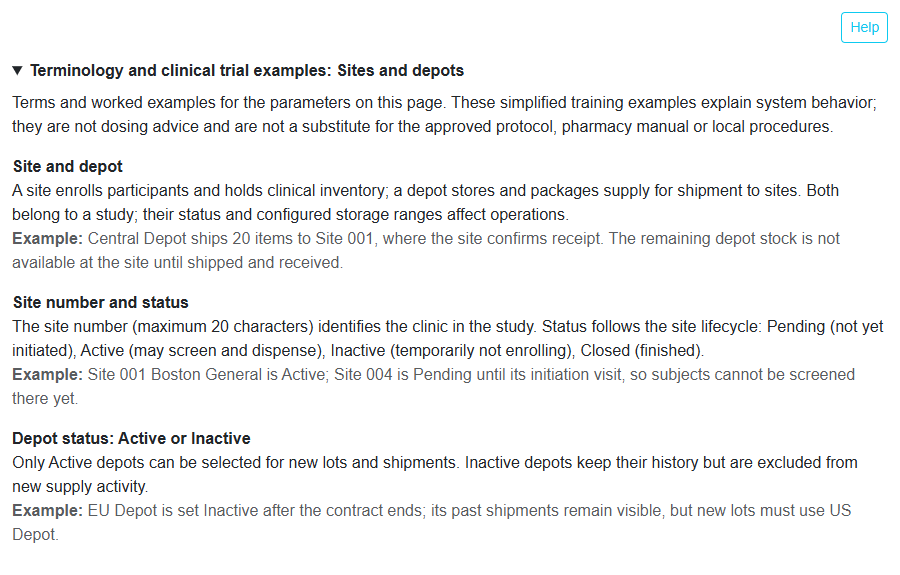
- Expand Terminology and clinical trial examples: {page}.
Section 2: Page-specific terminology
Each page explains its own parameters, with an Example for each term. For instance, Sites and depots explains site number and status, depot Active/Inactive status, investigator and consignee and ISO country codes, while Inventory explains kit status, lots and expiry.
Example: the Sites and depots help states that Site 004 is Pending until its initiation visit, so subjects cannot be screened there yet.
Troubleshooting and checks
Examples are simplified for training and are not dosing advice. If help text and an approved study document disagree, follow the approved document and report the discrepancy.
This guide supports training and does not authorize clinical decisions, override access controls or establish regulatory compliance. The approved protocol and organizational procedures remain authoritative.