
What is new compared with the earlier guidance
Content update: 22 October 2026. Earlier guides described manual study entry. The current implementation adds protocol-based assistance for study creation and design. Availability depends on your deployed application version and permissions; this guide is not a deployment announcement.
Prerequisites and scope
Create or select the study first and use its active Protocol in Study Documents. An authorized study manager may analyze that source; the document stays associated with its original study even if suggestions are reused as a template. The assistant is a protocol-analysis helper, not a clinical decision maker, design approver or activation authority.
Analyze a study protocol
- Select the correct Account and study; open Reports → Study Documents and upload the current protocol through the signed document workflow.
- Choose AI study-design help or open the selected study's Design assistant.
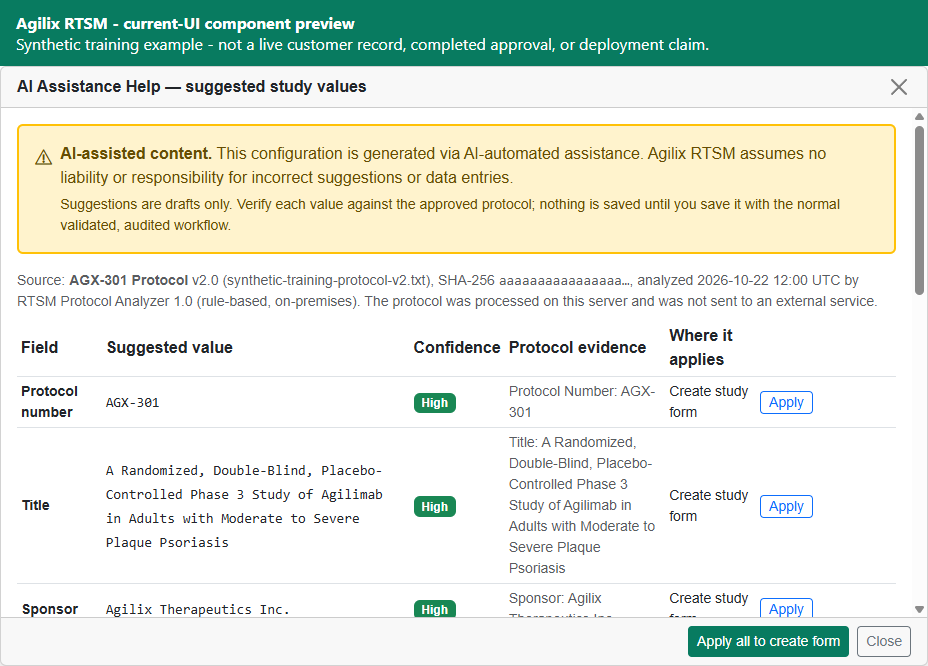
- Check the source document, version, file name, digest and analysis time.
- Compare each suggestion, confidence and source evidence with the approved protocol; uncertain values need human interpretation.
- Apply supported suggestions to the unsaved form and review before saving and independent approval.
The inspected analyzer processes protocol content on the application server, not an external AI service. Analysis does not move documents between studies or automatically save a design.
Continue through design review
After creation, use Study Design AI help to review suggestions by Settings tab and design step. Applying suggestions never replaces saving, amendment controls, independent design approval, UAT or activation checks.
When extraction fails or a value is not supported, configure it manually. Do not treat confidence as proof of correctness or upload unnecessary personal data.
This guide supports training and does not authorize clinical decisions, override access controls or establish regulatory compliance. The approved protocol and organizational procedures remain authoritative.