
What changed
Content update: 22 October 2026. Earlier password-and-reason guidance is superseded for new signatures by a manually entered assigned Signer ID, password and reason for every signing action. Sign-in email codes remain a separate authentication step. Your signing identity must be enrolled, active and current under your organization's procedures.
One-time identity approval
On My account or Customer agreements, acknowledge that your electronic signature is legally binding and that your credentials remain individual, then request verification. An independent authorized administrator verifies your identity against existing personnel or onboarding evidence, reviews possible existing signer records and retains one evidence reference. The system assigns and permanently reserves your initial username as your Signer ID. You cannot approve yourself. Your acknowledgment is not a substitute for organizational identity verification or certification to FDA under 21 CFR 11.100.
Sign the specific action
- Review the record, action, version and displayed signing meaning.
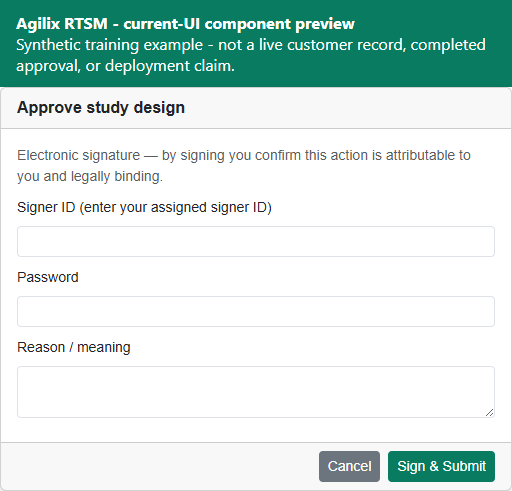
- Enter your own assigned Signer ID and password, then the reason. Never share signing credentials.
- Select Sign & Submit once and read the result. Both credential fields are cleared after an attempt.
- If a timeout or connection loss leaves the outcome unknown, close the dialog, refresh the record and inspect signature history before attempting another signature. The dialog does not automatically retry.
Suspended or compromised signing credentials, disabled access, expired credentials and overdue accountability reviews can block signing. Contact your authorized Account administrator rather than using another person's identity.
Read a signature without assuming current approval
Where available, the record shows printed name, UTC signing time, meaning, reason and retained version/hash. Authorized users may retrieve the signed snapshot PDF. Account, study, site and blinding restrictions apply; some full snapshots require broader unblinded authorization.
Verified identifies successfully checked binding to retained evidence, not blanket regulatory compliance. Historical / legacy-unbound means no exact-version snapshot was captured for that older signature. Invalid requires escalation; do not treat it as verified. Later edits do not inherit approval of the earlier signed version.
Regulatory context
These controls support signature manifestations and record linkage under 21 CFR 11.50 and 11.70 and identification controls under 11.200. Organizational identity verification, training, agency certification where applicable and intended-use validation remain separate responsibilities.
See the signed-version history preview for reading the retained manifestation.
This guide supports training and does not authorize clinical decisions, override access controls or establish regulatory compliance. The approved protocol and organizational procedures remain authoritative.