
Purpose
Store permitted regulatory/operational physical documents without deleting their historical evidence.
Expected outcome
You can distinguish a new version, metadata change and archive action, and locate retained version/event history.
Prerequisites
Select an Account and open Reports. View/upload/change access depends on the document type, named role and administrative context. A general report permission does not grant every document operation.
Section 1: Document types and access
The thirteen supported types are Protocol, Master Randomization List, Blinding Plan, User Requirements Specification, IRB Approval, Site Clearance, Delegation of Authority, Certificate of Analysis, Safety Data Sheet, Depot Packaging Records, Shipping Documents, Temperature Records and Destruction Records. Use the actual permitted choices displayed for your role. Master-randomization/depot-packaging document visibility has additional unblinded restrictions for non-administrators.
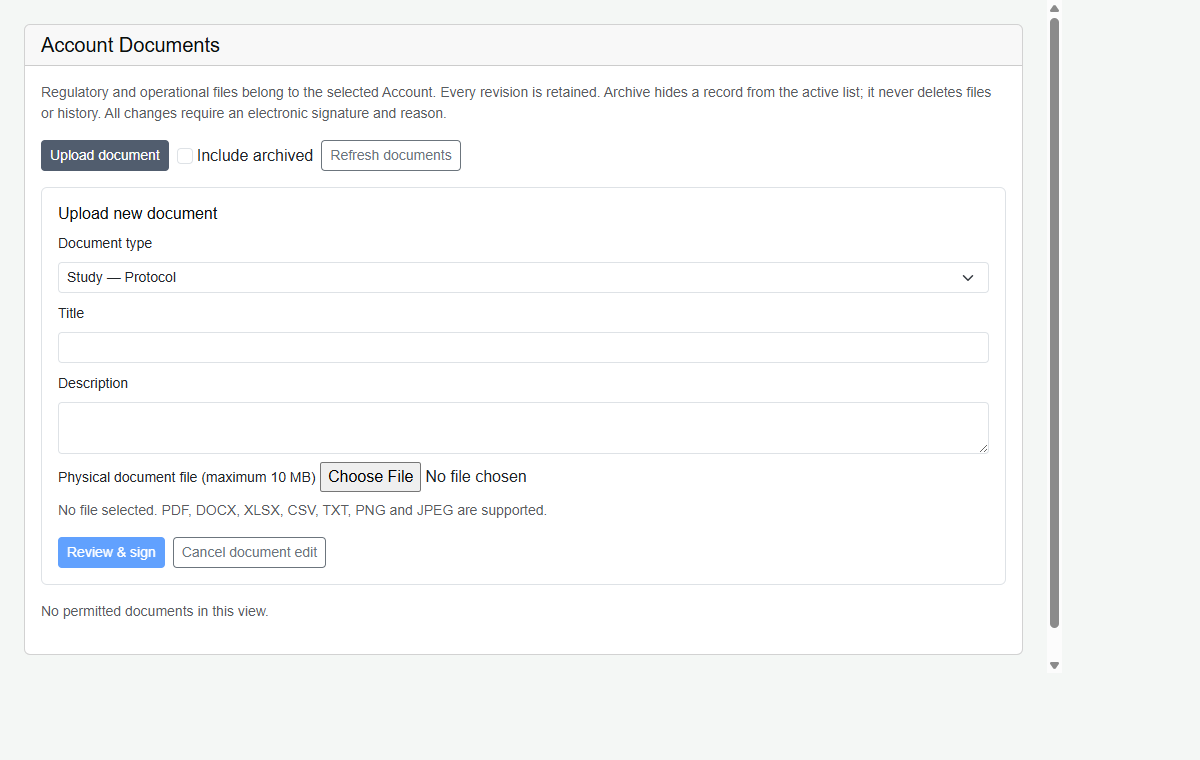
Accepted files are PDF, DOCX, XLSX, CSV, TXT, PNG and JPEG, up to 10 MB. Titles are limited to 200 characters and descriptions to 2,000 characters. Authorized System/Account administrators are treated as unblinded in the relevant service rules. Mutation uses its named-role rules separately; never assume every upload is authorized solely because a user holds an unblinded flag.
Section 2: Upload and revise
- Open the Account documents section in Reports and choose the permitted document type.
- Provide accurate metadata and the approved file, respecting accepted formats and limits shown by the application.
- Complete the required signature and meaningful reason.
- For a revision, use the new-version operation on the existing document. Do not create a misleading duplicate to conceal history.
- Check the retained version history for uploader, timestamp and justification.
Section 3: Metadata, archive and restore
| Action | Retained result |
|---|---|
| Modify metadata | Signed change/event context; modifications require a reason. |
| Upload revised file | New retained version entry; earlier bytes/history remain. |
| Archive / soft delete | Inactive record hidden from ordinary views, not permanent byte deletion. |
| Restore | Signed reactivation recorded in event/audit history. |
Standard users must not perform hard deletion of uploaded records. Retention periods and archive oversight must be defined by organizational procedure.
Troubleshooting and checks
Check Account scope, document type, role and archived filter before concluding a record was deleted. Preserve history if an incorrect file was uploaded; use the controlled revision/archive workflow and document the issue.
This guide supports training and does not authorize clinical decisions, override access controls or establish regulatory compliance. The approved protocol and organizational procedures remain authoritative.